I've been picking up a lot of chatter on RSS Feeds and Blogs about Google's "Sketchup" being used by Professionals and by Autistic Children, who are spatially gifted. I know my daughter also likes this tool, but it's not used "yet" in the traditional classroom, so she doesn't pursue it as much as I would like (...sigh...).
I'm not really sure where these types of tools fall in the overall Curricular, Instructional, and Services structure, hence, I'm cc'ing all of you - sorry. But, lots of good chatter out there and the tool is absolutely wild. It gets really interesting when one overlays their design onto Google Earth, like their back yard, or under developed area, or downtown Phoenix (called a "Mashup"). Talk about authentic learning and engagement by kids.....;-)
Video on projects created by Autistic Children at;
Business is starting to use SketchUp because of it's design power (see below link as an example tutorial on the "Section" tool), the price (free to cheap), it's multi-platform, you don't need a specialized and very potent/expensive computer to run it (TCO), but really because of where the world is heading in IT, and that's sharing and Mashup's - the ability to interface your creations with data bases and other tools and other people, thereby creating a whole 'nuther perspective into Web 2.0. As an example of business use, our Transportation Department just procured our first-ever "mashed up" application using GPS sensors for our buses, and Google Maps for real time routing location and traffic flow. Businesses are going to exploit these tools during the next 10 years - so should we.
Example video on how to use the "Section" tool;
Link to the SketchUp 3D Warehouse, consisting of designs shared by users all over the world (Web 2.0):
We can continue to pay licensing fees and support commercial software, but we can also push towards what the PVUSD Technology Plan calls for - Open Source solutions, wherever possible and appropriate. I believe network centricity is going to be critical over the next many years - technology solutions that don't interface with other tools and data on the internet are locked in, and will have a high probability of fading into obsolescence.
Jeff.....
Sunday, May 18, 2008


Google and Web 2.0 Tools in Plain English
Short videos on Google Tools, but nice for understanding concepts....
Docs and Shared Docs in Plain English
RSS in Plain English
Twitter in Plain English
Wikis in Plain English
Podcasting in Plain English
Blogs in Plain English
Online Photo Sharing in Plain English
Social Bookmarking in Plain English
Docs and Shared Docs in Plain English
RSS in Plain English
Twitter in Plain English
Wikis in Plain English
Podcasting in Plain English
Blogs in Plain English
Online Photo Sharing in Plain English
Social Bookmarking in Plain English
Google Tools for the Classroom
Useful tool - tools, tips, posters and classroom activities to get you started
Google Tools for your Classroom....
Google Tools for your Classroom....
pvlearners in pTUNES
Want some video snippets on using pvlearners - go for it, compliments of pTUNES.....;-)
Best Practices
1. Use of pvlearners is for communication and collaboration among students and teachers in PVUSD for school activities and educational goals.
2. Students are expected to be self-motivated and responsible with their pvlearners accounts. This includes following the expectations outlined for student behavior per the PVUSD student handbook.
3. Users of pvlearners need to be aware of the following:
4. Activities conducted with pvlearners accounts should be legal, educational, nondisruptive, and adhere to the PVUSD acceptable use policy for Electronic Information Services.
5. Students' Start Pages are to be created and maintained appropriately per the teacher's guidelines.
6. Parental permission/notification is required before pvlearners accounts can be used by students.
7. pvlearners accounts have been established through Google Services and are subject to the terms and conditions of Google.
2. Students are expected to be self-motivated and responsible with their pvlearners accounts. This includes following the expectations outlined for student behavior per the PVUSD student handbook.
3. Users of pvlearners need to be aware of the following:
- Keep your personal information private (including photos, profiles, emails, blogs, wikis, web pages, etc.)
- Keep personal information of others private
- Treat others with respect
- Be aware that published content is viewable by all users of the Internet
4. Activities conducted with pvlearners accounts should be legal, educational, nondisruptive, and adhere to the PVUSD acceptable use policy for Electronic Information Services.
5. Students' Start Pages are to be created and maintained appropriately per the teacher's guidelines.
6. Parental permission/notification is required before pvlearners accounts can be used by students.
7. pvlearners accounts have been established through Google Services and are subject to the terms and conditions of Google.
What is pvlearners?
"pvlearners.net" is an internet domain registered under PVUSD that enables all employees and students to have Google accounts for email, calendars, shared docs/spreadsheets/presentations, blogs, wikis, groups, RSS feeds, and web pages. Please note that these accounts are full, internet, resources and tool enabled. Consequently, understanding and practicing appropriate online use is important for all users, and this practice can not be underscored enough. Concepts such as identity theft, scams, spam, cyberpals, ethics, not disclosing personal information, digital stranger danger, advertising, etc., should be taught, discussed and understood by all users. The Technology Department stands ready to help you present information on these or any topic, should you so desire.
"pvlearners" was created for three reasons:
We currently have the capability for 40,000 accounts that are maintained by our district. At this time we have over 19,000 accounts activated for general communication, many entire schools activated, and many teachers (k-12) actively exploring 21st-century, online collaboration and learning (beyond email) with their students.
You can view the start page for "pvlearners" at http://mail.pvlearners.net.
Additional information is available at the "pvlearners" blog, http://pvlearners.blogspot.com. Training movies are being developed in pTUNES (http://ptunes.pvschools.net), under the Information Technology link, and our subscription to Atomic Learning (http://www.atomiclearning.com) provides online tutorials on use of Google documents, spreadsheets, and presentations.
For information on voluntarily getting your school, teachers and students participating in rich, online communication and collaboration, please contact Jill Felty (jfelty@pvschools.net). Principal approval is required and we are now only acception entire schools, or a one time activation of entire grade levels - sorry, no more one, tow or three teachers. Parental notification/permission is required per Board policy. Please note that not all teachers at a school have to participate with the tools, but at least they can get student homework/communication sent from a known/trusted email address (pvlearners.net), instead of "whatever@yahoo.com", "cooldude@msn.com", etc. Teachers can also have the option to set up their pvlearners account to automatically forward email to their ConnectMe account, simplifying email management. Additionally, student usernames/passwords are set with PVUSD's external model, which teachers have access to through "My Roster" in pDAT (http://pdat.pvschools.net).
Please note that there is a reasonable probability that next year, pvlearners accounts will be available to all students. It's 2008, and moving from analog to digital is upon us all, throughout the world.
"pvlearners" was created for three reasons:
- to prepare students for their future,
- to meet state and national technology standards,
- and to keep our practice current.
We currently have the capability for 40,000 accounts that are maintained by our district. At this time we have over 19,000 accounts activated for general communication, many entire schools activated, and many teachers (k-12) actively exploring 21st-century, online collaboration and learning (beyond email) with their students.
You can view the start page for "pvlearners" at http://mail.pvlearners.net.
Additional information is available at the "pvlearners" blog, http://pvlearners.blogspot.com. Training movies are being developed in pTUNES (http://ptunes.pvschools.net), under the Information Technology link, and our subscription to Atomic Learning (http://www.atomiclearning.com) provides online tutorials on use of Google documents, spreadsheets, and presentations.
For information on voluntarily getting your school, teachers and students participating in rich, online communication and collaboration, please contact Jill Felty (jfelty@pvschools.net). Principal approval is required and we are now only acception entire schools, or a one time activation of entire grade levels - sorry, no more one, tow or three teachers. Parental notification/permission is required per Board policy. Please note that not all teachers at a school have to participate with the tools, but at least they can get student homework/communication sent from a known/trusted email address (pvlearners.net), instead of "whatever@yahoo.com", "cooldude@msn.com", etc. Teachers can also have the option to set up their pvlearners account to automatically forward email to their ConnectMe account, simplifying email management. Additionally, student usernames/passwords are set with PVUSD's external model, which teachers have access to through "My Roster" in pDAT (http://pdat.pvschools.net).
Please note that there is a reasonable probability that next year, pvlearners accounts will be available to all students. It's 2008, and moving from analog to digital is upon us all, throughout the world.
Wednesday, May 14, 2008
Edit Google Spreadsheet With Everyone
Sent to you by Jeff via Google Reader:
via Google Blogoscoped by Philipp Lenssen on 5/14/08
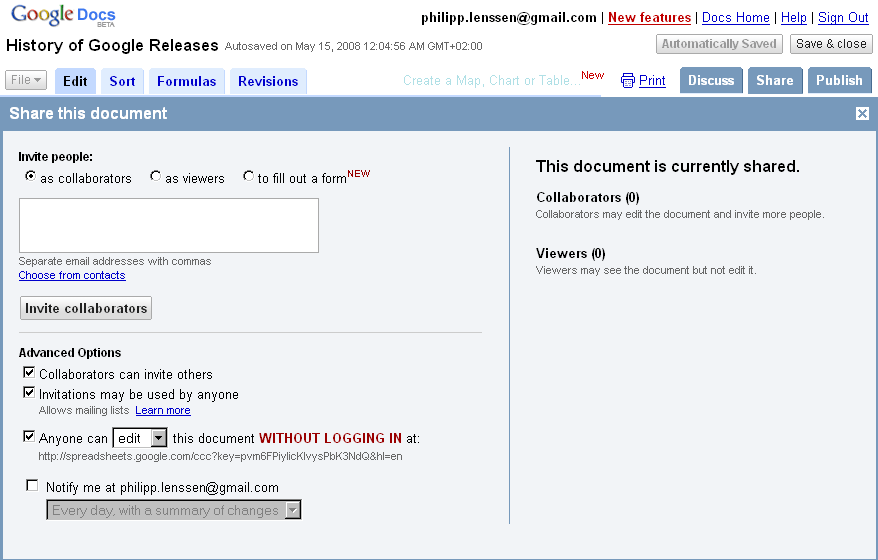
Ionut Alex. Chitu reports you can now edit a spreadsheet with anyone who knows the URL, as an option, and not just people with a Google account which you invite. To set this up, start at Google Docs and click New Spreadsheet. Prepare your data and hit the Share tab; now configure the "Anyone can [edit] this without logging in" box, and share the URL Google provides you with. Ionut says, "your spreadsheet becomes a wiki."
For sample purposes, you can now edit along the History of Google Releases spreadsheet.
[By Philipp Lenssen | Origin: Edit Google Spreadsheet With Everyone | Comments]
[Advertisement] Want to advertise here? Your ad will show in the blog and feed.

Things you can do from here:
- Subscribe to Google Blogoscoped using Google Reader
- Get started using Google Reader to easily keep up with all your favorite sites
Google Docs adds mobile access support
Sent to you by Jeff via Google Reader:
via The official update feed from the Google Apps team by Google Apps Team on 3/11/08
Users can now sign in and view documents and spreadsheets from their mobile devices, including the iPhone.
Editions impacted:
Standard, Premier, Education and Partner Editions
Languages impacted:
US English
How to access what's new:
From your mobile phone's browser, sign in to Google Docs at docs.google.com/a/your.domain/m.
For more information:
http://docs.google.com/support/spreadsheets/bin/answer.py?answer=77428

Things you can do from here:
- Subscribe to The official update feed from the Google Apps team using Google Reader
- Get started using Google Reader to easily keep up with all your favorite sites
Google Spreadsheets adds gadgets, revision notifications and more
Sent to you by Jeff via Google Reader:
via The official update feed from the Google Apps team by Google Apps Team on 3/19/08
Spreadsheet gadgets let you visualize your data in interesting, intuitive ways. For example, you can see addresses on an interactive map, or create dynamic time series charts that let you zoom in and scroll through a graph.
Revision notifications let you set up alerts so you know when someone makes changes to a spreadsheet.
Other new features include the ability to select cells for formulas with arrow keys, an expanded color palette, text auto-complete from other cells in the same column, a new function auto-complete feature, and new sort(), filter() and unique() functions.
Editions impacted:
Standard, Premier, Education, Team and Partner Editions
Languages impacted:
US English
How to access what's new:
Sign in to Google Docs, open a spreadsheet, and click the 'Add' button in the toolbar. (The icon looks like a bar chart.) Then select "Gadget..." to see all the gadget options.
See links below for other feature access instructions.
For more information:
http://documents.google.com/support/spreadsheets/bin/topic.py?topic=14187
http://documents.google.com/support/spreadsheets/bin/answer.py?answer=91588
http://documents.google.com/support/spreadsheets/bin/answer.py?answer=92022

Things you can do from here:
- Subscribe to The official update feed from the Google Apps team using Google Reader
- Get started using Google Reader to easily keep up with all your favorite sites
Subscribe to:
Posts (Atom)


